Monthly update
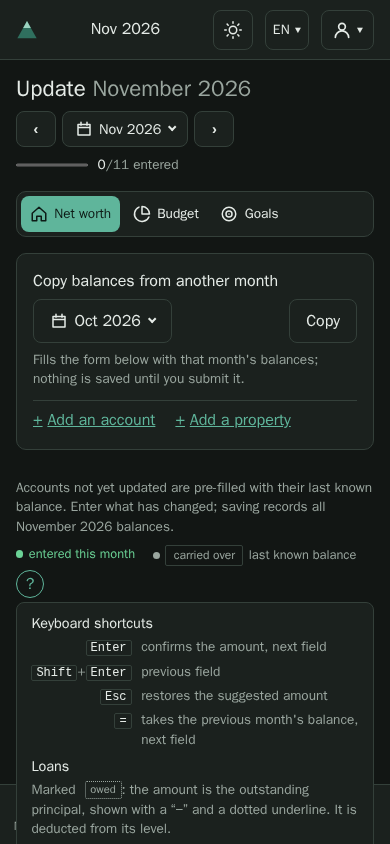
Monthly update menu (Update on a phone), in three tabs: Net worth (the balances of the accounts, described
here) and Budget (the amounts of the household budget) for the same month,
and Goals (creating and changing your savings goals). This menu, the last one on the right, is always
put forward; as long as no balance of the current month is entered, it turns red, with a dot, to remind you.
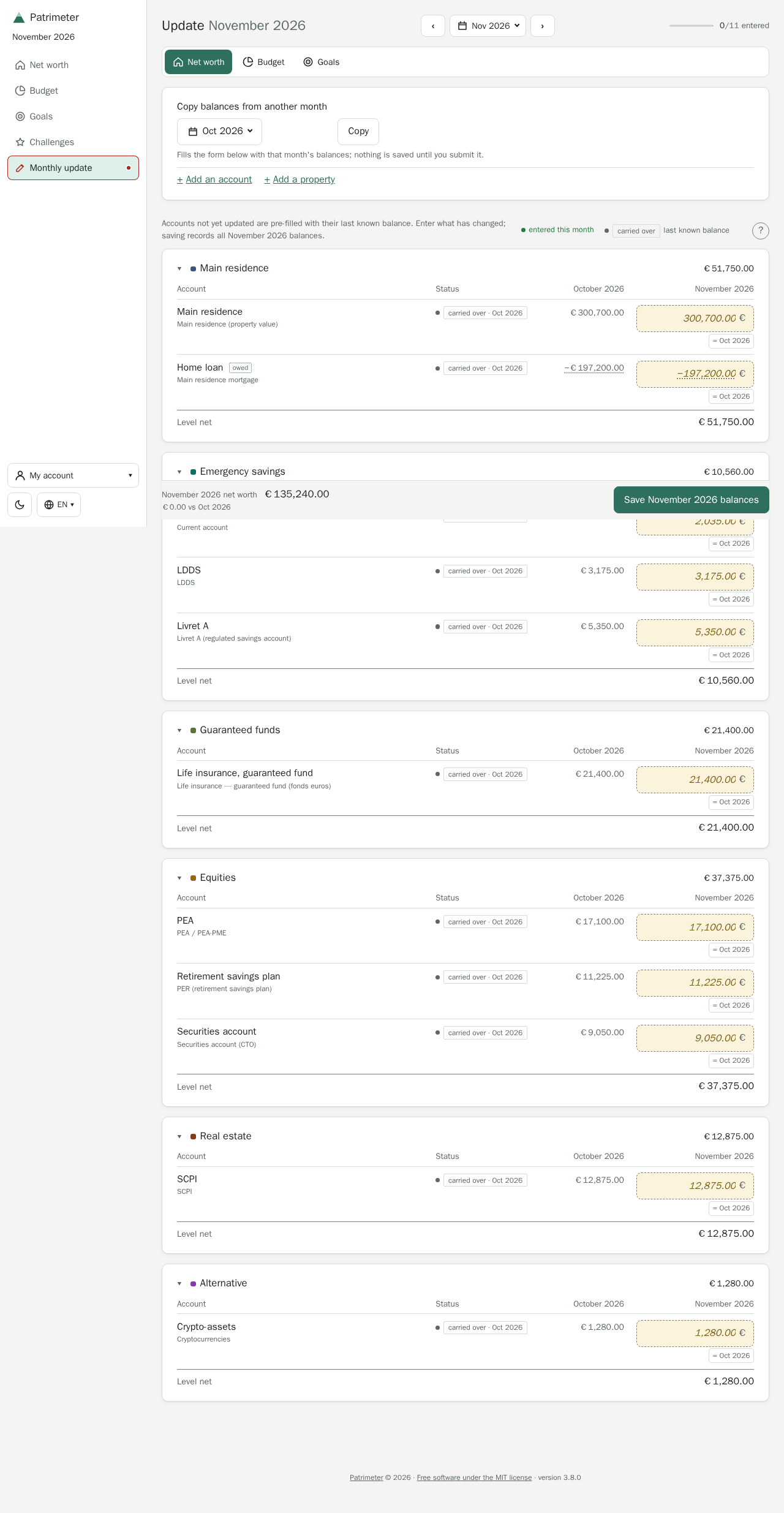
The Net worth part shows all the accounts open that month, on a single screen, one table per level of the
pyramid. Enter the balances (English format: 12,345.67), then save the month's balances (Save
… balances). Next month can be entered in advance (last arrow, or the calendar); once saved, the
Net worth page shows that month.
Reading the screen
Each row shows the account, its status, its balance for the previous month and the field for the month being entered. On a phone, the previous balance moves under the account name.
- entered (green dot): a balance is already saved for this month.
- carried over (grey dot, badge): no balance this month; the field is pre-filled with the last known balance, whose month is shown in the badge.
- no balance: the account has no balance yet.
- to refine (dashed badge): approximate amount given when the account was created, on the welcome pages. Correct it if needed: saving records it as the month's balance and removes the mention.
- Loans are marked owed: their amount is the outstanding principal, preceded by "−" and underlined with dots, and it is deducted from the level.
At the top right, a small bar shows how many accounts are entered ("4/8 entered"). Under each table, Level net gives the total of the level; at the bottom, the month's net worth. These totals are worked out again as you type and take into account your share of properties owned with others (real estate).
Under a changed amount, a discreet difference compares it with the previous month ("+€460.00 vs Oct 2026"); for a loan, a lower principal owed is a positive difference. Under the month's net worth, the same difference applies to the whole net worth, worked out again as you type.
An account that has not moved is confirmed in one gesture: the = Oct 2026 button under its field takes the previous month's balance, marks it "entered" and moves to the next account.
A level whose balances are all entered this month is folded: only its name, the word entered and its total stay visible, to leave room for what is left to do. Tap its name to unfold it and correct a balance; it also unfolds by itself when you reach it with the keyboard. Its balances are still saved with the others.
Entering quickly with the keyboard
| Key | Effect |
|---|---|
| Enter | confirms the amount (the account becomes "entered") and moves to the next field, without sending the form |
| Shift + Enter | goes back to the previous field |
| Esc | restores the suggested amount |
| = | takes the previous month's balance (the account becomes "entered") and moves to the next field |
These shortcuts, and the reminder about loans, are in the ? help to the right of the legend.
What is saved
- Saving the month (Save … balances) records all the balances shown as the month's balances.
- An account left empty is not saved: it keeps its last known balance, carried over to the following months. So there is no need to enter, every month, an account that does not move.
- For a loan, enter the outstanding principal, with or without the "−":
167,612.87and−167,612.87mean the same amount. - For a property, enter the total value of the property: Patrimeter applies your share.
- For another month, choose it at the top of the page: to catch up on a forgotten month or correct a past month. As long as no account exists, the update stays on the current month and offers neither another month nor a copy of the balances: only Create an account and Create a property.
- If the entry changes the status of a savings goal, a message says so at once ("Goal "Down payment": Behind → On track").
Copying balances from another month
To fill in a past year quickly, start from a month already entered: Copy balances from another month, at the top of the monthly update, fills the form with the balances of the chosen month (entered or carried over). The month is picked from the calendar, as at the top of the pages. The copied rows are marked "copied"; correct what has changed, then save the month: nothing is saved before. An account without a balance in the chosen month keeps its usual value. The same box leads to adding an account or a property.
Going back in time. You started Patrimeter in November and want to enter October? Go to October: if no account is open that month yet, the page offers the copy directly, from the current month. Copy the November balances: the accounts opened after October are included too, marked "opening moved back". When you save, their opening date moves to 1 October and their October balances are saved; an account whose field you empty keeps its original opening date. For a property, its initial ownership share also applies to the earlier month, including to its prorated loan. Later changes keep their effective dates.